


Easy to use with complete control. Powered by geometry nodes and a procedural materials. All settings are available inside the N-panel.
(No need to touch nodes :)
Full N-panel is in documentation.
All together. When combined, these features give you complete control to create skies exactly the way you need.
Question you might have
What’s the difference between scaling in Edit Mode and Object Mode? Scaling in Edit Mode expands the texture. In Object Mode, the noise scales together with the shape.
Can I isolate a single cloud from the system? Yes. Use the Empty Boolean to cut out a cloud with soft edge noise. The cloud can then be moved, rotated, and scaled freely in Object Mode.
How to go to Site Styles ? Add paragraph text. Click “Edit Text” to update the font, size and more. To change and reuse text themes, go to Site Styles.
How to change Site Styles ? Add paragraph text. Click “Edit Text” to update the font, size and more. To change and reuse text themes.
The entire preset library is at the bottom of the page.
Procedural Clouds
Create clouds exactly the way you need. Turn any shape into a beautiful cloud, adjust the form in Edit Mode, choose from a large number of starting presets and refine the look in the N-panel.

What is Volumetrics Pro ?
Most realistic procedural volumetrics for Blender.
Complete freedom in customization.
Solid preview on Fog & Clouds.
Easy to use.
Solid mode preview
Render
Made out of these shapes
What is Volumetrics Pro? It’s an addon that lets you create custom traffic simulations and quickly fill parking lots with cars. Whether you're animating a single vehicle or simulating traffic with hundreds of cars, everything is real-time using proxy vehicles. Addon includes 55 built-in models with real brands and 46 models with copyright-free brands, all of which are also available as standalone rigged assets.
Empty boolean
Unlimited styles
Solid Mode preview
Procedural skies

Volumetrics Pro
Clouds based on
real-world
Realistic wind animation
98 pre-made presets
The entire library is at the bottom of the page
All professional
Volumetrics in 1 place
Smoke simulations coming as next update
Powered by
geometry nodes
User-friendly
N-panel settings
Create your own clouds

VOLUMETRICS
vɒl.juːˈmɛ.trɪks
Noun
1. Volumetrics simulate the interaction between light and participating media, calculating how photons scatter, absorb, and decay throughout three-dimensional space. This means lighting is no longer evaluated only on surfaces, but continuously across the volume between them.
2. In other words, it’s not about lighting objects - it’s about lighting that nothing between them. (It is more important than it seems like)
Why we created this addon ? We wanted to have all volumetrics we use in one place.
Because only together they create the Atmosphere.
We decided to make them fully procedural, so users have as much control as possible. The volumes side of Blender and its addons has always felt quite limited to us.
We also wanted volumetrics you can actually preview in solid mode (we never thought it would work this well), while making sure they look as realistic as possible - both in solid and, more importantly, in the final render.
Why early access? We believe the addon is already great and can help a lot of people right now - but to release it the right way, we want to finish smoke animations first. Thank you for the support and trust you show us by purchasing this product.
Solid Mode preview on all our volumetrics
Preview fog, skies, clouds and clouds on curve in Solid Mode for faster scene building
and camera work, especially in heavy projects.
Tutorial
FOG
| CLOUDS | SMOKE SIMULATIONS

Create atmosphere. Adding volumetrics, especially fog to almost any scene can completely transform the mood and look, taking your renders to the next level.
Add depth. Create a stronger sense of space and scale in your scenes.

Add light rays. Let light interact with the air between objects, not just their surfaces.
Easy to use with full control
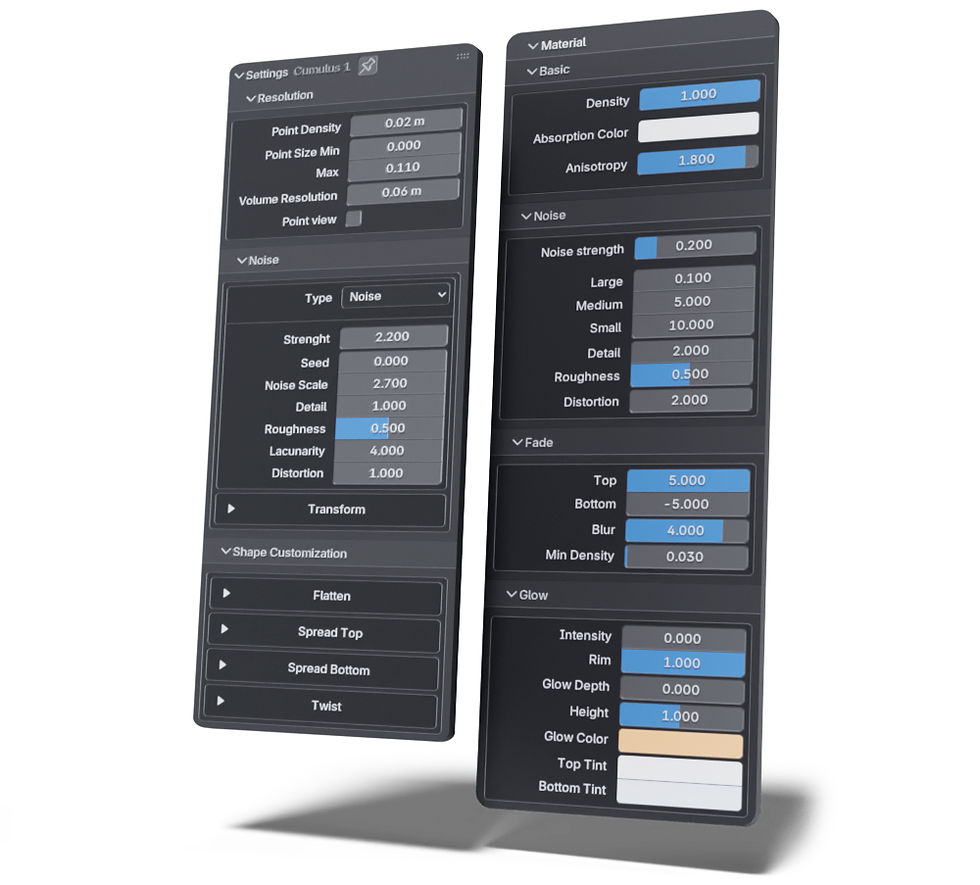
Easy to use with complete control. Powered by geometry nodes and a procedural materials. All settings are available inside the N-panel.
(No need to touch nodes :)
Full N-panel is in documentation.
Question you might have
How to change and reuse text themes, go to Site Styles ? Add paragraph text. Click “Edit Text” to update the font, size and more. To change and reuse text themes.
How to change and reuse text themes ? Add paragraph text. Click “Edit Text” to update the font, size and more. To change and reuse text themes, go to Site Styles.
How to go to Site Styles ? Add paragraph text. Click “Edit Text” to update the font, size and more. To change and reuse text themes, go to Site Styles.
How to change Site Styles ? Add paragraph text. Click “Edit Text” to update the font, size and more. To change and reuse text themes.
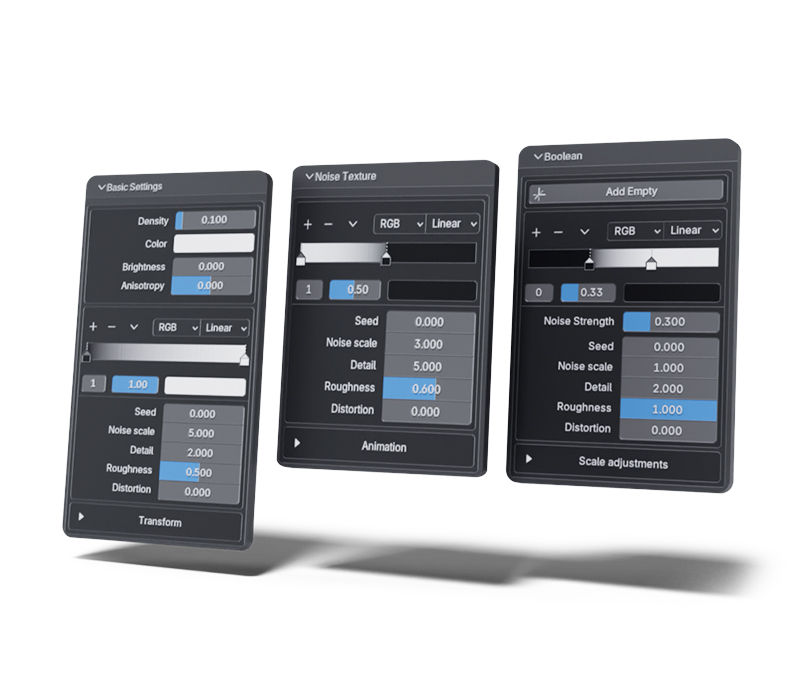
Color ramp + Noise + Transform. These three core elements form the foundation of every fog.
Combined with our Empty Boolean, you can create any combination you need.
Black = 0% density, white = 100% density and shades of gray represent levels in between depending on how light/dark they are.
Density & Height
The Color Ramp controls the contrast of the noise. More black reveals gaps in the noise, while more white makes gaps less visible.
Noise
Boolean
The Color Ramp also controls the strenght of boolean. When you switch sides you create inverse effect.
Easy to use with complete control. Powered by geometry nodes and a procedural materials. All settings are available inside the N-panel.
(No need to touch nodes :)
Full N-panel is in documentation.
Any shape you need. Shape the fog in Edit Mode. Scaling in Edit Mode keeps the noise size consistent, while Object Mode scales the texture with the object.
Empty boolean. Customize the shape with an Empty Boolean that can be freely moved, scaled, and rotated. A separate noise controls the edge detail.
Unlimited styles
Question you might have
When does the solid mode preview helps the most ? It gives you greater sense of space in solid mode but biggest help is in wind animation preview were you can preview animations with viewport render.
Is solid mode preview realtime ? Yes, when you move around scene. When you change settings, it depends on level of detail you choose. Level of detail in preview can be changed in N-panel.
Is solid mode preview 100% accurate ? Yes, but it depends on preview resolution setting, in high numbers gives you almost 1:1 with render, in lower numbers you at least now where it is or is not. It also depends on lighting but you can always adjust preview density acording to your needs.
How to make fog render faster ? Light paths volume to 4, Volume max steps to 24. In our preferences you can enable that addon automaticaly chage these settings together with import.
All together. When combined, these features give you complete control to create fog exactly the way you need.
The entire preset library is at the bottom of the page.
The entire preset library is at the bottom of the page.
Tutorial
CLOUDS
FOG | | SMOKE SIMULATIONS

3 unique procedural cloud systems. Unlimited styles.
Clouds on Curve
A curve-based version of the procedural cloud system, perfect for adding details, with fully adjustable shape and shader controls. Use Alt + S to adjust the radius of individual points along the curve.
Most realistic procedural clouds.
Real wind animation.
Procedural Sky
Create fully procedural skies by shaping the object to any form in Edit Mode. Use the Empty Boolean to isolate or cut out areas, and adjust the clouds easily with shader controls in the N-panel.

Question you might have
How to change and reuse text themes, go to Site Styles ? Add paragraph text. Click “Edit Text” to update the font, size and more. To change and reuse text themes.
How to change and reuse text themes ? Add paragraph text. Click “Edit Text” to update the font, size and more. To change and reuse text themes, go to Site Styles.
How to go to Site Styles ? Add paragraph text. Click “Edit Text” to update the font, size and more. To change and reuse text themes, go to Site Styles.
How to change Site Styles ? Add paragraph text. Click “Edit Text” to update the font, size and more. To change and reuse text themes.

Easy to use with complete control. Powered by geometry nodes and a procedural materials. All settings are available inside the N-panel.
(No need to touch nodes :)
Full N-panel is in documentation.
Preset library
The entire preset library is at the bottom of the page.


